%20--%3e%3cdefs%3e%3cstyle%3e%20.st0%20{%20fill:%20%23f15a29;%20}%20.st0,%20.st1,%20.st2,%20.st3%20{%20stroke:%20%23414042;%20stroke-linecap:%20round;%20stroke-linejoin:%20round;%20stroke-width:%2011px;%20}%20.st4%20{%20display:%20none;%20fill:%20%23fff;%20}%20.st1%20{%20fill:%20%2300aeef;%20}%20.st2%20{%20fill:%20%2339b54a;%20}%20.st3%20{%20fill:%20%23ffde17;%20}%20%3c/style%3e%3c/defs%3e%3crect%20class='st4'%20width='650'%20height='650'/%3e%3cg%3e%3cpath%20class='st0'%20d='M190.8,288.9h157.4v-51.1c6.6,8,16.7,13.1,27.9,13.1,20,0,36.2-16.2,36.2-36.2s-16.2-36.2-36.2-36.2-24.3,9.5-27.9,13.1v-102.8s-15.6,5.7-26.3,13.6c-15.5-11.5-34.8-18.3-55.7-18.3-37.9,0-70.4,22.3-84.5,54.2-2.4-.2-4.9-.3-7.4-.3-50.8,0-91.9,40-91.9,89.3v3.5c-19,14.1-32.8,34.6-37.8,58.2h99.9c-8-6.6-13.1-16.7-13.1-27.9,0-20,16.2-36.2,36.2-36.2s36.2,16.2,36.2,36.2-5.1,21.2-13.1,27.9h0Z'/%3e%3cpath%20class='st1'%20d='M376,250.9c-11.2,0-21.2-5.1-27.9-13.1v76.4h109.2c-8,6.6-13.1,16.7-13.1,27.9,0,20,16.2,36.2,36.2,36.2s36.2-16.2,36.2-36.2-7.7-22.6-13.1-27.9h89c.4.7-5.5-7.9-9.6-12.3,1.1-5.6,1.7-11.3,1.7-17.2,0-31.7-17-59.6-42.7-75.4-.6-48.1-40.3-86.9-89.6-88.1-16.7-22.5-43.9-37.2-74.6-37.2s-25.7,2.8-29.4,4.7v102.8c6.6-8,16.7-13.1,27.9-13.1,20,0,36.2,16.2,36.2,36.2s-16.2,36.2-36.2,36.2h-.2Z'/%3e%3cpath%20class='st3'%20d='M347.8,509.2c.2-6.2.4-10.1.4-10.1v-89c-6.6,8-16.7,13.1-27.9,13.1-20,0-36.2-16.2-36.2-36.2s16.2-36.2,36.2-36.2,25.8,11,27.9,13.1v-75.1h-157.4c8-6.6,13.1-16.7,13.1-27.9,0-20-16.2-36.2-36.2-36.2s-36.2,16.2-36.2,36.2,5.1,21.2,13.1,27.9H44.7c-1.4,6.6-2.2,13.4-2.2,20.3,0,54.5,41.8,97.5,117.7,97.5,13.4,33.1,44.2,56.6,85.5,56.6s44-10.9,44-10.9c21.6,11.2,37.9,28.9,51.1,46.9h0c2.4,3.3,4.7,6.6,6.9,9.8v.2Z'/%3e%3cpath%20class='st2'%20d='M592.5,314.3h0c0-.1-88.9-.1-88.9-.1,5.4,5.3,13.1,14.4,13.1,27.9,0,20-16.2,36.2-36.2,36.2s-36.2-16.2-36.2-36.2,5.1-21.3,13.1-27.9h-109.2v49.7c-2.1-2.1-11.3-13.1-27.9-13.1s-36.2,16.2-36.2,36.2,16.2,36.2,36.2,36.2,21.3-5.1,27.9-13.1v89s-.2,3.9-.4,10.1c20.5,27.9,26.7,47,40.9,53.7s45.4,2.3,51-8.6c4.2-8.1-12.5-26.4-7.9-54,10.5,4.1,21.9,6.3,33.9,6.3,41.5,0,76.6-26.8,88-63.5,31.4-14.2,53.1-45.1,53.1-80.9s-11.4-43.7-14.3-47.9Z'/%3e%3c/g%3e%3c/svg%3e)
Puzzle Brain Club
All your favorite puzzles in one place
How to play Sudoku
The Goal
Fill every row, column, and 3×3 box with the numbers 1 through 9 without any repeats. Each puzzle starts with some numbers already placed—those are locked and cannot be changed.
Placing Numbers
Click any empty cell to open the on-screen numpad. Choose a number 1–9 to place it. Selecting the same number again will clear it (toggle off). Locked cells cannot be edited.
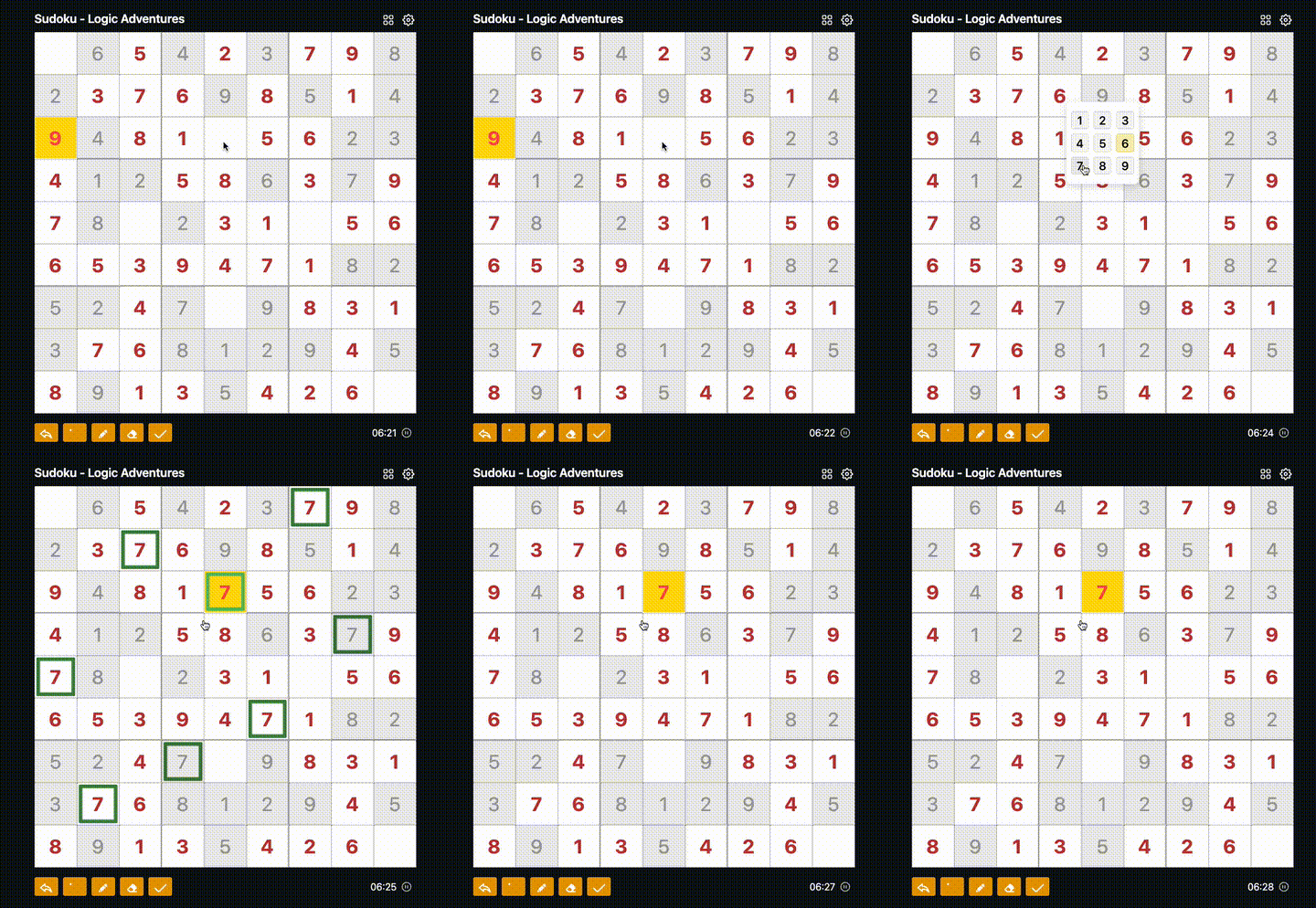
Notes & Erasing
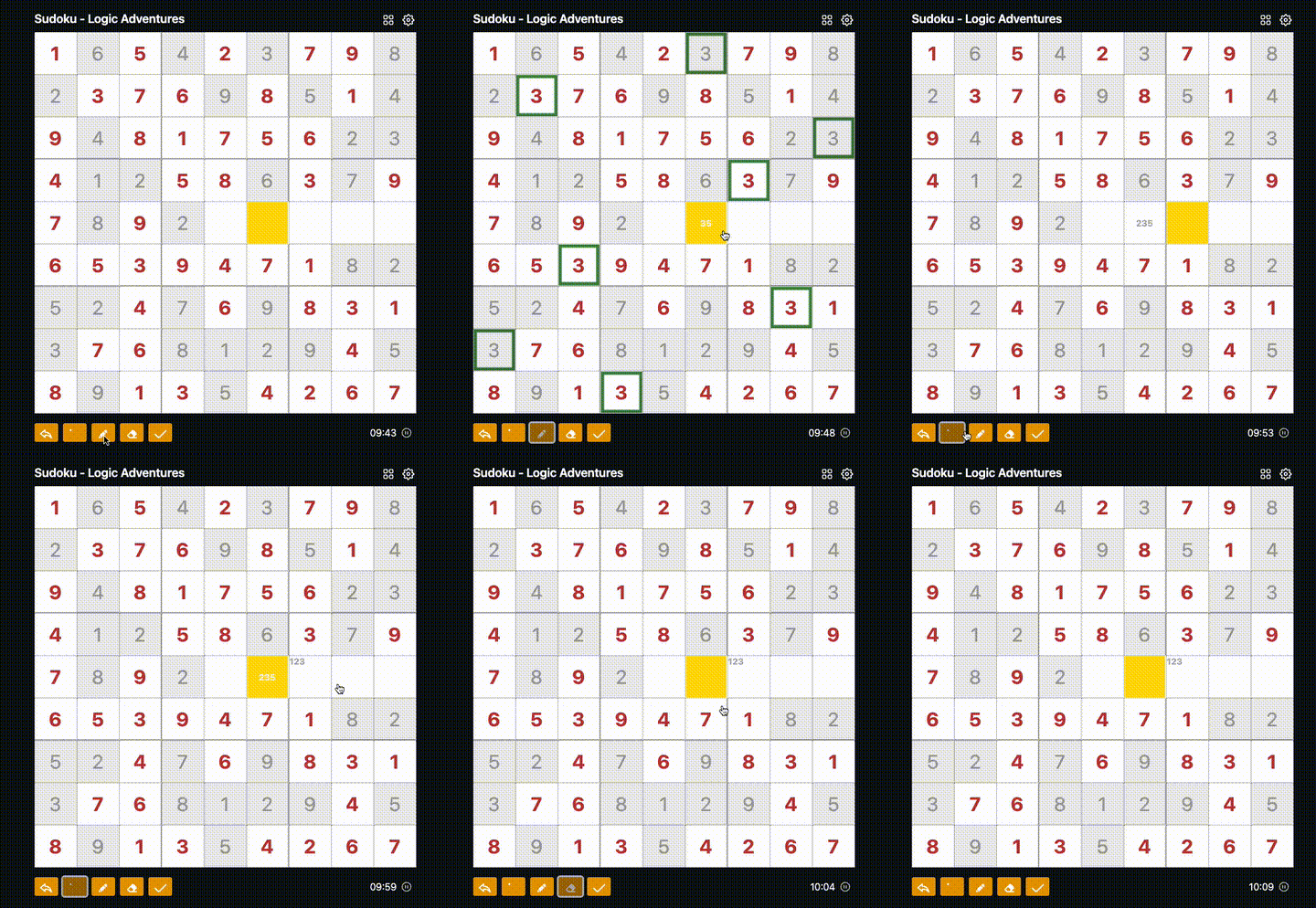
- Notes (top): Tap the corner-notes button, then pick numbers to jot small hints in the cell's top area.
- Notes (center): Tap the center-notes button for larger center hints.
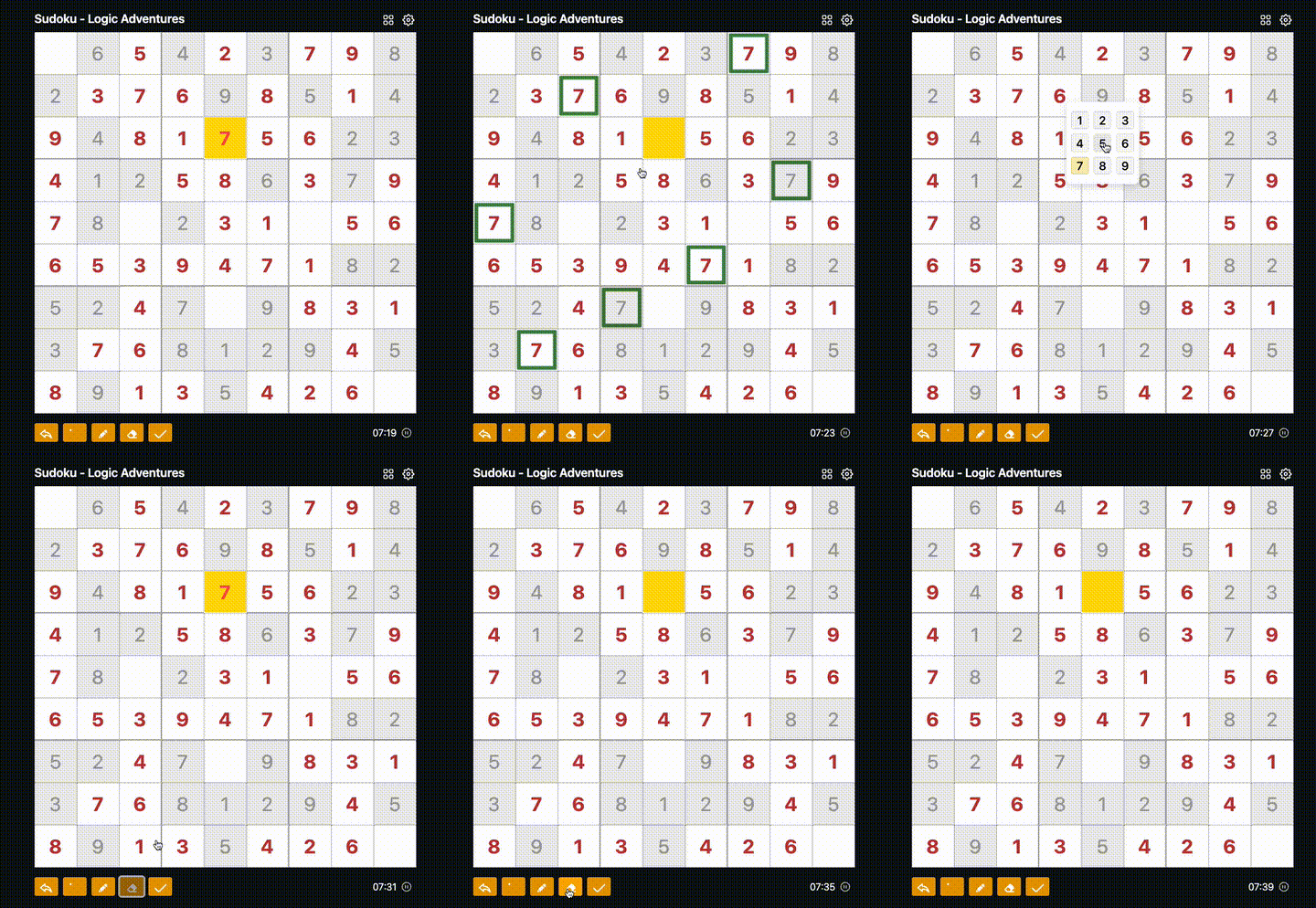
- Eraser: Select the eraser, then click a cell to clear its value and notes.
- Undo: Use Undo to revert the last change (stores up to the last 10 moves).
Check Result
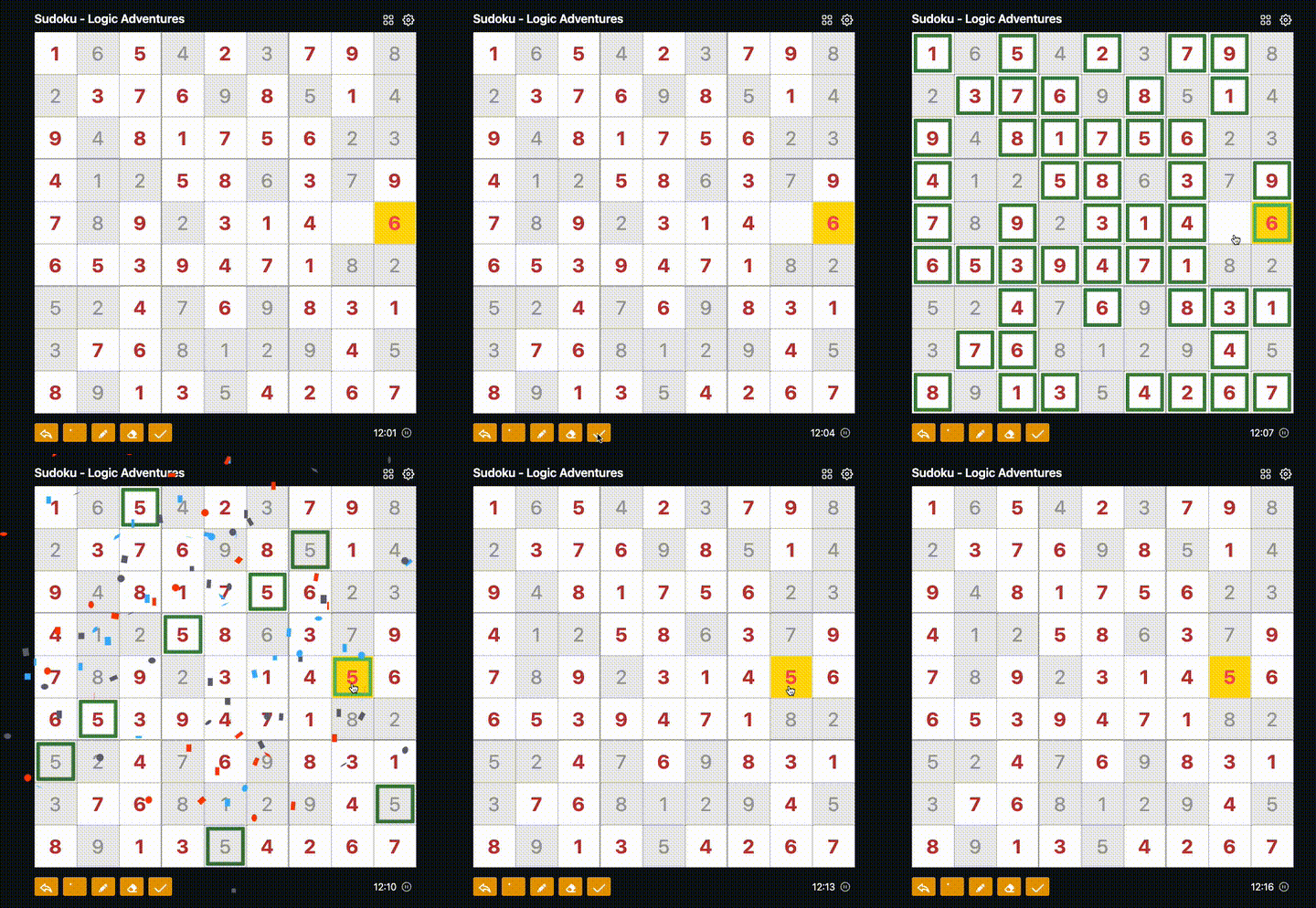
Press Check Result to highlight correctness without ending the game:
- Green outline = correct.
- Red outline = incorrect.
- No overlay or credits are given from this button; it's just feedback.
Tips
- Each number 1–9 must appear exactly once in every row, column, and 3×3 box.
- Use notes to track possibilities; erase or overwrite as you narrow choices.
- Use Undo freely; up to the last 10 moves are kept.
Settings
Open the settings (gear icon at the top) to customize your gameplay:
- Show timer: Toggle the on-screen timer on or off.
- Highlight same numbers: When enabled, clicking a number briefly highlights all matching numbers on the board.
These preferences are saved on your device and persist between sessions.
Earning Credits
Finishing a Sudoku grants credits based on how fast you solve it. Faster completions earn more:
| Time | Credits Earned |
|---|---|
| ≤5 minutes | 15 credits |
| ≤10 minutes | 10 credits |
| >10 minutes | 5 credits |
Credits are awarded automatically when the puzzle is fully correct. Signing in ensures they are saved to your account and appear in your profile activity log.